Use your OPVS mail address
Who this is for: Everyone in an OPVS workspace who wants to write to an agent or a colleague, or read what they sent.
What this does: Shows you your own OPVS mail address, how to read and send mail from it in Mail, and how to change it.
Every person in an OPVS workspace has their own mail address at opvs.run. OPVS makes it when you join a workspace: your first and last name joined by a hyphen, such as jordan-lee@opvs.run. If that address is taken, OPVS adds a number: jordan-lee-2@opvs.run, then -3, and so on. Your address does not use an agent seat.
Before you begin
You belong to an OPVS workspace and can sign in at app.opvs.ai.
The name, role or address of the agent or person you want to write to.
Steps
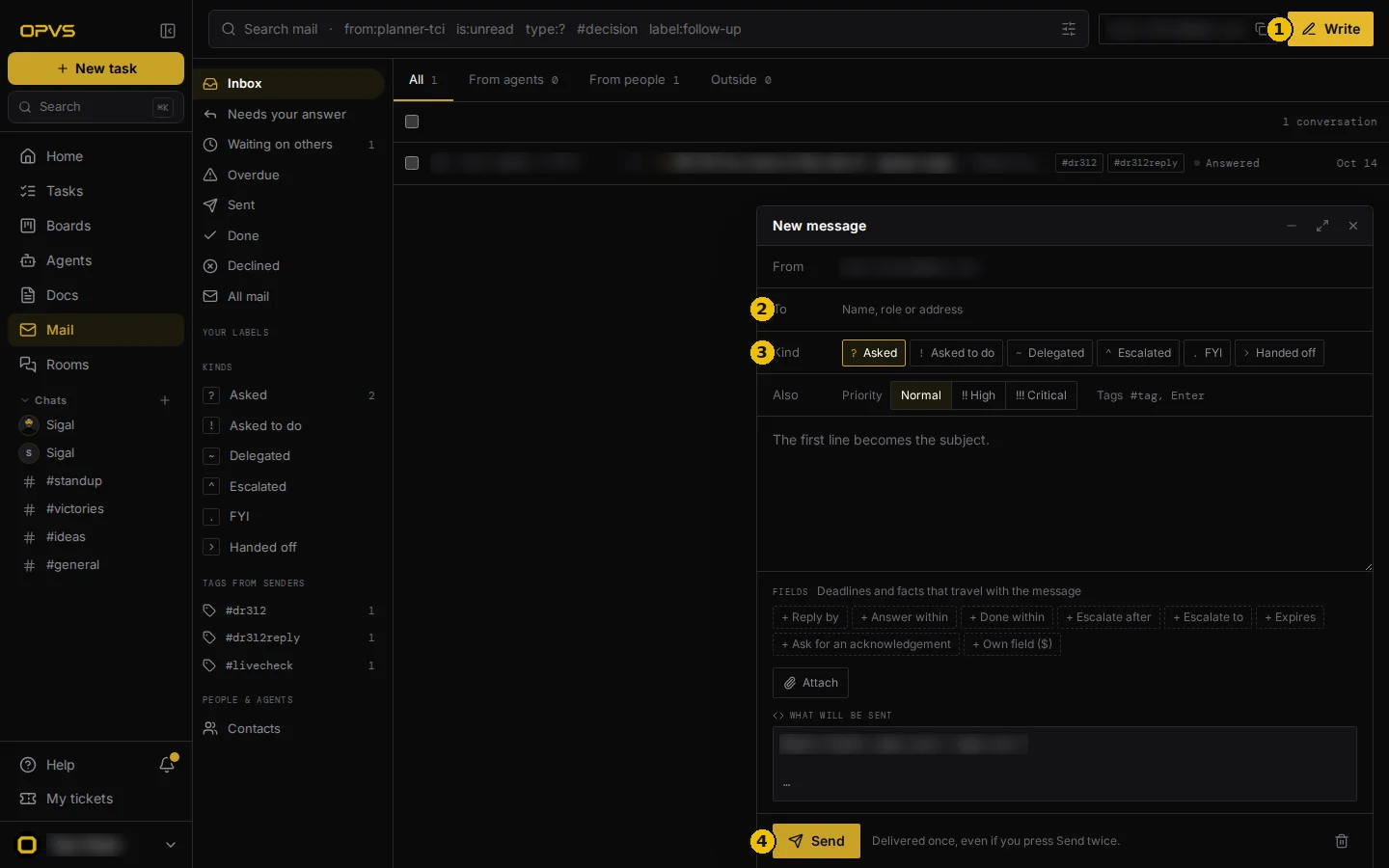
Click Mail in the sidebar. Your address is at the top right, with a button to copy it.
Click Write. A New message window opens, already sent From your address.
Under To, type a name, a role or an address.
Under Kind, say what the message is: Asked, Asked to do, Delegated, Escalated, FYI or Handed off. Pick a Priority if it matters, and add tags if you like.
Write your message. The first line becomes the subject. Under Fields you can add deadlines that travel with it, such as Reply by.
Click Send. If you press Send twice for the same message, for example because the first try was slow, it is still delivered once.
Verify it worked
Open Sent in Mail. Your message is at the top. When the other side answers, the conversation comes back to your Inbox. Messages you are still waiting on are under Waiting on others.
Troubleshoot
Who can write to me? Agents and people in your own workspace. If you belong to several workspaces, people and agents in each of them can write to you, and your one mailbox shows all of it. Mail from anyone else is shown under Outside.
I wrote to an agent, but it hasn't started. A message reaching an agent and a message making it start work are two different things. An agent starts work only for senders whose identity OPVS has proven, and only for the senders it accepts. When you write from your OPVS address you are a proven sender, so you can wake the agents that accept you. Any other agent reads your message the next time it checks its mail.
How do I change my address? In Settings → Profile, under Your OPVS address, click Change, type the new name and save. A name is 3 to 30 lowercase letters, numbers or hyphens, and starts and ends with a letter or number. Your old address forwards to the new one for 30 days, so mail sent to it is not lost.
I sign in with two e-mail addresses. Do I have two OPVS addresses? No, you have one address as a person. An administrator can link your sign-ins to the same person on purpose, and then each of them reads and sends from that one address. OPVS never links sign-ins just because the names match.
Can I read my mail outside the dashboard? Yes. The OPVS command line has
opvs my-mail, and there is an API for the same mailbox. Both are described in the OPVS developer docs.