Turn a feature on or off
Who this is for: Workspace admins who want to add an optional feature to their workspace, or take one away.
What this does: Adds or removes Skills, Feed, Machines or CRM for everyone in your workspace. Turning a feature off hides it; nothing it holds is deleted.
Before you begin
- You are an admin of the workspace. Only admins can open the Features page.
- The feature is in your plan. A feature your plan does not include shows Not in your plan and a See plans link, and its switch cannot be turned on.
The four optional features:
| Feature | What turning it on adds |
|---|---|
| Skills | Skills in the sidebar: the marketplace of skill packages. Install a package, then choose which of your agents may use it. |
| Feed | Feed in the sidebar: a reader for the social accounts and sites you follow. |
| Machines | No sidebar item. The Building group appears in Settings, for your own machines that run coding agents. |
| CRM | No sidebar item. A CRM tab appears inside Tasks: companies, contacts and deals as three linked boards. |
Home, Tasks, Boards, Agents, Docs, Mail and Rooms are in every workspace and are not switches.
Steps
- Click Settings at the bottom of the sidebar.
- Under Workspace, click Features.
- Find the feature under Optional features and click its switch.
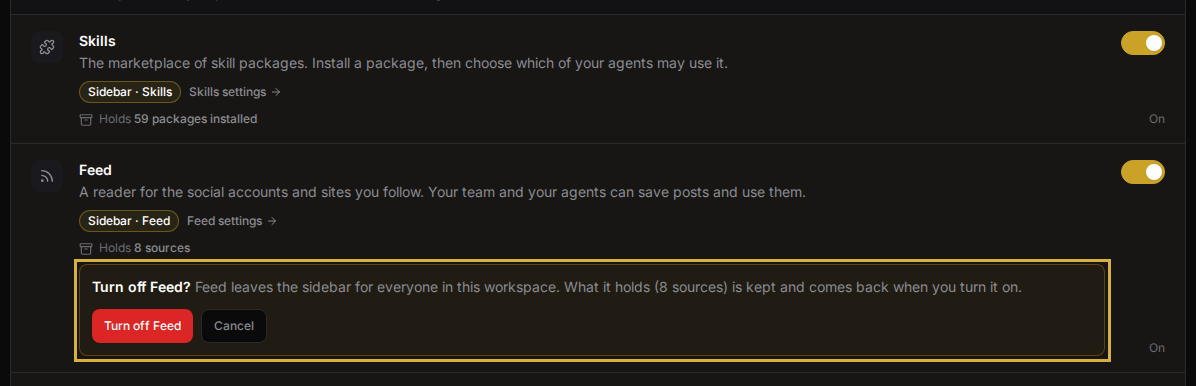
- Turning a feature on saves at once. Turning a feature off asks first, and tells you that nothing the feature holds is deleted. Click the Turn off button, which names the feature, to confirm, or click Cancel.
Verify it worked
- A line under the feature confirms the change, for example Saved. Skills is in the sidebar now. or Turned off. Nothing was deleted.
- Look at the sidebar. Skills and Feed appear or disappear there. For Machines, open Settings and look for the Building group. For CRM, open Tasks and look for the CRM tab.
The change applies to everyone in the workspace at once.
Troubleshoot
- Why can't I click the switch? The feature is not in your plan. The row shows Not in your plan and a See plans link to Billing & plans.
- Why don't I see Settings in the sidebar? You are not an admin of this workspace. Ask an admin to change the feature for you.
- I turned a feature off. Is my data gone? No. Turning a feature off removes the sidebar item and the ways in. Packages, sources, machines and boards stay as they were. The feature's row lists what is Kept, and it all comes back when you turn the feature on again.
- I turned off Machines. Are my machines stopped? No. Machines that are running keep running. Only the Building group leaves Settings.
- The page says "Couldn't update". Nothing changed. Try again in a moment.